FarmBot
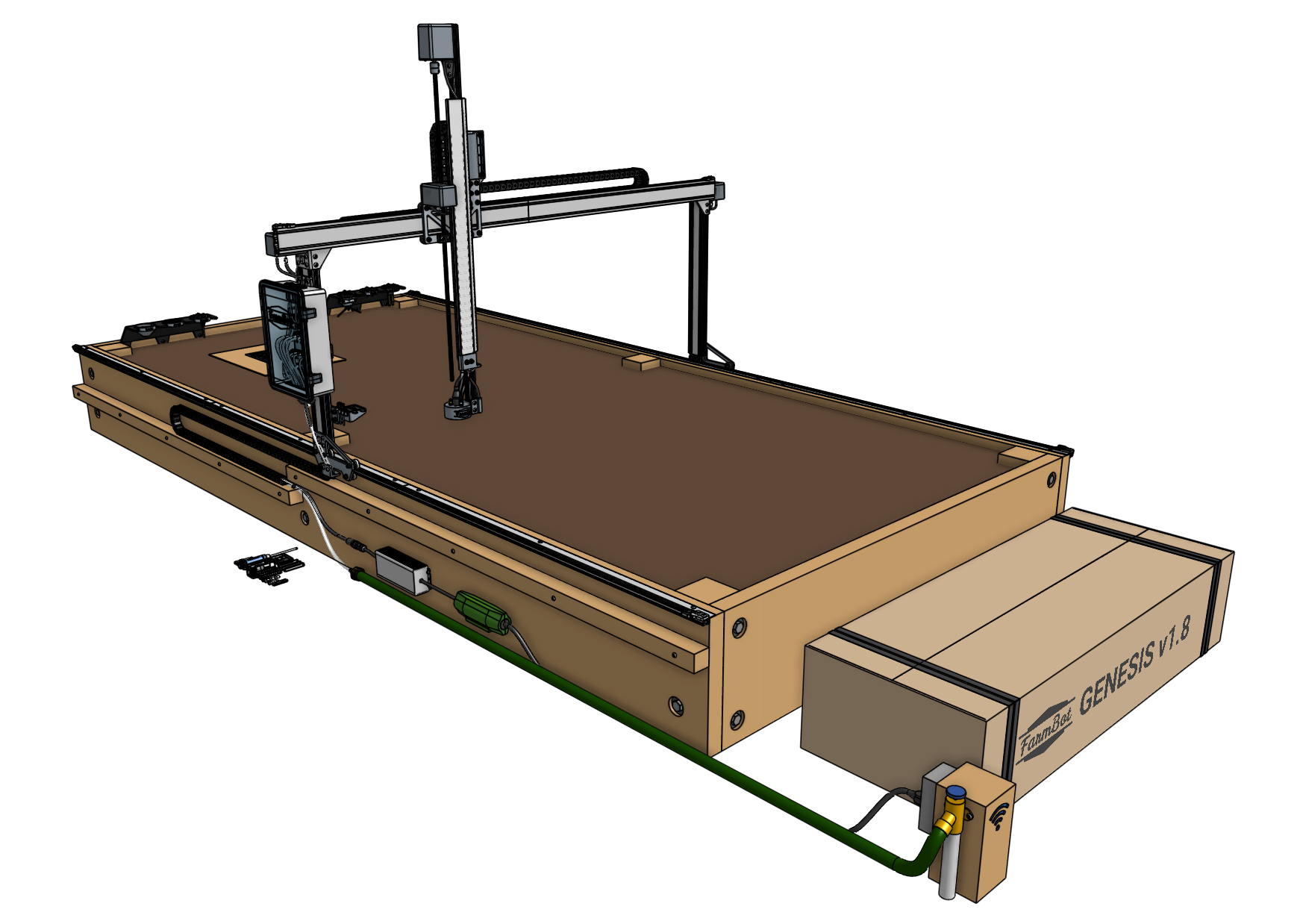
Robot / hardware buildTrack-mounted gardening robot with a moving gantry and interchangeable tools; this profile selects FarmBot Genesis v1.8 documentation and distinguishes the standard and XL installations. [1] [5] [8]
Build & first use →Official website
- For
- Garden robotics builders able to prepare a bed, utilities and a version-matched installation [1]
- Cost
- No current cost or bill of materials established yet.
- Source rights
- Named licenses are documented by part. Review licenses
- Unknowns
- tools, operating system not fully established. Review gaps
Source researched · Not tested by us
Sources checked · Research details

Licenses & related hardware
- License
- CC0-1.0, MIT · Details by part
Overview
FarmBot Genesis moves a gantry along fixed tracks, a cross-slide across the gantry and a tool along the z-axis. This entry selects the v1.8 documentation. Its overview specifies four NEMA 17 stepper motors with rotary encoders, Farmduino electronics and a Raspberry Pi, with different sizes for Genesis and Genesis XL. [5]
Is this for you?
- Known limitations
- Standard and XL infrastructure widths differ and cannot exceed the documented limits
- Farmduino peripheral connectors vary with production dates
- Documentation archive does not preserve the complete linked CAD, electronics and firmware payloads
- Published BOM prices exclude delivery, taxes and other sourcing costs
3D preview
FarmBot Genesis v1.8 assembly. The stable FarmBot Genesis v1.8 Production Run 1 Onshape version with Genesis, Default position, Fixed Raised Bed infrastructure and Closed Electronics Box selected. The preview includes the robot and supporting infrastructure; packaging, calibration card and spare-parts groups are excluded. Meshes are reduced for interactive display, and no physical installation or operation is verified.
The 3D preview loads after the page.
Drag to orbit · Scroll or pinch to zoom · Right-drag to pan. Use the view buttons for front, side and top views. The tree shows names supplied by the source; unnamed bodies remain labeled as such.
Download original GLTF source evidence bundle (ZIP) · File checksums and provenance · Download complete source (gzip)
Separate bodies can be inspected in the model tree. Explode is a viewing aid, not an assembly sequence.
Model sources
The preview uses the linked original design. Source grouping is retained where present; the caption identifies whether this is an assembly or one component.
Source, license and scale
Source: FarmBot Inc, Rory Aronson and FarmBot contributors, revision 29ff27176ad028c3b865f257. Original and preview: CC0-1.0. Preview conversion by Open Source Robotics; the original source export is checksum-retained in the published numbered chunks. Preview coordinates are centered and rounded to six decimal places. Source GLTF node transforms and selected assembly groups were retained, metres were converted to millimetres and mesh triangles were reduced for interactive display. No physical part tested.
Viewer: three-cad-viewer 5.0.7 (MIT license). Confirm scale and manufacturing settings before printing.
What you need
- Host computer
Raspberry Pi 4B with 1 GB RAM in the selected v1.8 documentation; runs FarmBot OS and communicates with Farmduino by USB serial.
Hardware & parts
- Hardware configuration
Fixed-bed Cartesian gantry gardening robot with tracks, cross-slide, z-axis and universal tool mount.
- Actuators
- Four NEMA 17 stepper motors with rotary encoders
- Tool and peripheral actuation depends on installed tools
- Controller
Farmduino with ATmega2560, STM32 encoder coprocessor and TMC2130 stepper drivers.
Assembly & first use
Cost
No current, complete configuration-specific build cost has been established for this profile.
Preserve source scope and budget assumptions
The official CAD guide links a versioned Onshape document, describes copying and exporting the models, and assigns them CC0. This review preserved the guide, not an exported CAD payload. The documentation repository itself uses MIT; its license should not be used as a substitute for checking each separately linked artifact. [3] [6]
The BOM page calls its prices informational and excludes shipping, taxes, duties, minimum orders, waste and research time. It also limits scratch-build support to the published documentation and community route. This catalog therefore leaves the complete delivered installation cost unknown. No CAD fabrication, firmware installation, gardening run or yield test was performed. [7] [8] [10]
Project notes
The growing area and supporting structure use different dimensions
The overview describes a standard 3 m by 1.5 m arrangement and an XL 6 m by 3 m arrangement. The infrastructure guide separately limits the outer supporting width to 1.36 m for standard Genesis and 2.86 m for XL. Those widths are not the same measurement as the growing-area dimensions and must not be substituted for them when building a bed. [5] [9]
The guide offers raised beds, posts and pier-block supports, but does not recommend its mobile raised-bed design for XL. It also explains how to scale down track length and gantry width. These constraints make the supporting structure part of the configuration, rather than an incidental item to choose after the robot arrives. [9]
Follow the written v1.8 changes when using the assembly video
The preparation page still links a v1.7 assembly video and directs readers to the written v1.8 documentation when they differ. It highlights 1 m track extrusions, sliding horizontal cable-carrier supports and a vacuum pump mounted to the cross-slide. Treat the video as a companion to the selected written instructions, not an exact visual record of every v1.8 part. [8]
Its assembly estimates assume the supporting infrastructure is already prepared. Power, water and an internet connection are also part of installation preparation. No kit was assembled and none of these time estimates was reproduced by this review. [8]
Match the electronics and peripheral connectors
The selected Pi specification is Raspberry Pi 4B with 1 GB RAM. It runs FarmBot OS, communicates with the web application over the network and connects to Farmduino over USB serial. The Farmduino page identifies an ATmega2560, an STM32 encoder coprocessor and TMC2130 stepper drivers. [10] [11]
That page also documents connector changes tied to production dates and warns that replacement or upgrade cables must match the installed connectors. The Arduino firmware and STM32 encoder firmware are separate sources. The documentation archive alone does not preserve a complete, matched electronics and software build. [10]
What we checked
Source research only; no installation, physical build or performance test performed. No affiliate links added.
Not yet established
- Requirements: operating system, tools
- A step-by-step setup summary
Updates
- Upstream last updated
- May 5, 2026 [2]
- Latest release
- Not established
- Profile updated
- Oct 25, 2026
- Sources last checked
- Oct 1, 2026
- Next review
- Oct 31, 2026
- Reviewed revision
- 44e0fa24d4a538dfa1255a4e89308ccabf3abaeb (commit snapshot; no published stable release found) · combined hardware and software repository
Source files and licenses
Available project sources support research coverage; complete build and commercial qualification remain separate.
| Layer | Availability / license |
|---|---|
| mechanical design | available · CC0-1.0 Availability and CC0 dedication reported by version-specific official CAD guide. Linked Onshape model payload was not exported or preserved by this review. [6] |
| electronics | not found · License not fully assessed Official documentation identifies separate sources and components; complete matching payload and license audit for this layer remains outside the preserved documentation snapshot. Not a claim that external public sources do not exist. [10] [11] |
| firmware | not found · License not fully assessed Official documentation identifies separate sources and components; complete matching payload and license audit for this layer remains outside the preserved documentation snapshot. Not a claim that external public sources do not exist. [10] [11] |
| software | not found · License not fully assessed Official documentation identifies separate sources and components; complete matching payload and license audit for this layer remains outside the preserved documentation snapshot. Not a claim that external public sources do not exist. [10] [11] |
| documentation | available · MIT Documentation repository license; external CAD has a separately stated CC0 dedication. [1] [3] [5] |
Selected hardware and assembly profile does not assess a learned policy or training dataset.
References
Each source links to the exact revision we read. “Used for” shows where this page relies on it.
Project sources
- S001 FarmBot-Docs/farmbot-genesis: README.md
Revision, date & where cited
github.com · revision
44e0fa2· Accessed Oct 1, 2026
Used for: Assembly & first use, Source files and licenses - S002 FarmBot-Docs/farmbot-genesis: commit 44e0fa2
- S003 FarmBot-Docs/farmbot-genesis: LICENSE
Revision, date & where cited
github.com · revision
44e0fa2· Accessed Oct 1, 2026
Used for: Cost, Source files and licenses - S004 FarmBot-Docs/farmbot-genesis: files
Revision, date & where cited
github.com · revision
44e0fa2· archive file inventory · Accessed Oct 1, 2026 - S005 FarmBot Genesis v1.8/assembly/intro/high-level-overview.md
Revision, date & where cited
github.com · revision
44e0fa2· Accessed Oct 1, 2026
Used for: Overview, Hardware & parts, The growing area and supporting structure use different dimensions, Source files and licenses - S006 FarmBot Genesis v1.8/extras/cad.md
Revision, date & where cited
github.com · revision
44e0fa2· Accessed Oct 1, 2026
Used for: Is this for you?, Cost, Source files and licenses - S007 FarmBot Genesis v1.8/bom.md
Revision, date & where cited
github.com · revision
44e0fa2· Accessed Oct 1, 2026
Used for: Is this for you?, Cost - S008 FarmBot Genesis v1.8/assembly/intro/assembly-preparation.md
Revision, date & where cited
github.com · revision
44e0fa2· Accessed Oct 1, 2026
Used for: What you need, Assembly & first use, Cost, Follow the written v1.8 changes when using the assembly video - S009 FarmBot Genesis v1.8/assembly/supporting-infrastructure.md
Revision, date & where cited
github.com · revision
44e0fa2· Accessed Oct 1, 2026
Used for: Is this for you?, What you need, Assembly & first use, The growing area and supporting structure use different dimensions - S010 FarmBot Genesis v1.8/bom/electronics-and-wiring/farmduino.md
Revision, date & where cited
github.com · revision
44e0fa2· Accessed Oct 1, 2026
Used for: Is this for you?, What you need, Hardware & parts, Cost and 2 more - S011 FarmBot Genesis v1.8/bom/electronics-and-wiring/raspberry-pi.md
Revision, date & where cited
github.com · revision
44e0fa2· Accessed Oct 1, 2026
Used for: What you need, Match the electronics and peripheral connectors, Source files and licenses - S015 Upstream image and reuse attribution
Media-only review: Upstream illustration of FarmBot Genesis v1.8, not a photograph. Reuse basis: MIT; inspected LICENSE and the pinned file inventory for nearer notices. Original image unchanged; displayed responsively. This does not refresh technical or cost evidence.Revision, date & where cited
FarmBot Docs contributors · github.com · revision
44e0fa2· Image SHA-256 64a4d2a1a52809e7b089e271add10b47bb647f84082328e225f43d1fa435e842; repository · Accessed Oct 25, 2026
Videos
- S012 Camera - FarmBot Genesis v1.2 (YouTube video)
Video from the project’s own channel (FarmBot), linked from the project’s own documentation. Not reviewed by us for accuracy.Revision, date & where cited
YouTube video FarmBot · youtube.com · Accessed Oct 4, 2026
- S013 Cables - FarmBot Genesis and Genesis XL v1.4 (YouTube video)
Video from the project’s own channel (FarmBot), linked from the project’s own documentation. Not reviewed by us for accuracy.Revision, date & where cited
YouTube video FarmBot · youtube.com · Accessed Oct 4, 2026
- S014 FarmBot in Education - Inspiring the Next Generation of Farmers (YouTube video)
Video from the project’s own channel (FarmBot), linked from the project’s own documentation. Not reviewed by us for accuracy.Revision, date & where cited
YouTube video FarmBot · youtube.com · Accessed Oct 4, 2026
Correction guidance · Discussion is not enabled · Profile format 0.6.0-draft.1
Change history
2026-10-04 — Added 3 YouTube reference(s) (S012, S013, S014): official channel or videos linked from the pinned upstream sources. Existing claims, source-check dates and evidence are unchanged.
2026-10-25 — Added an attributed upstream image with linked reuse terms; technical evidence dates unchanged.