Upkie
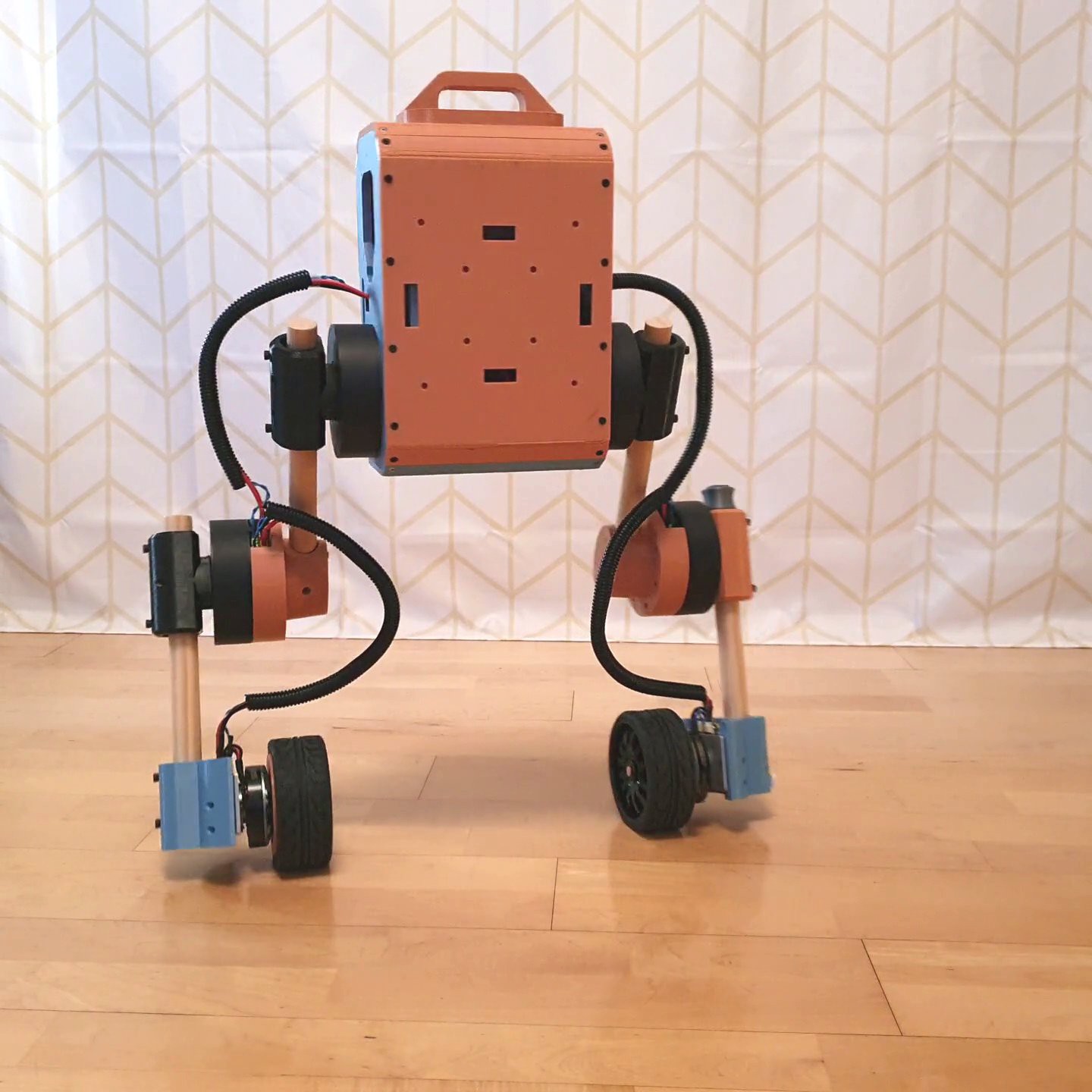
Robot / hardware buildWheeled biped with four leg servos, two driven wheels and a Raspberry Pi control stack; the reviewed build guide needs revision matching. [1]
Build & first use →Official websiteUpstream build guide
- For
- Robotics researchers and builders comfortable with actuator setup and printed mechanical assemblies [1]
- Cost
- No current cost or bill of materials established yet.
- Source rights
- Some licenses are unresolved. Review licenses
- Unknowns
- operating system not fully established. Review gaps
Source researched · Not tested by us
Sources checked · Research details
Licenses & related hardware
- Ecosystem
- Raspberry Pi
- License
- Apache-2.0 · license not fully assessed for electronics · Details by part
Overview
Upkie is a wheeled biped: four leg servos change its posture while two driven wheels balance and move it. The v12.0.0 software offers Python and C++ development, with a Raspberry Pi on the robot and PyBullet examples for a first simulation trial. The reviewed BOM specifies four qdd100 servos, two moteus wheel-actuator kits and a Raspberry Pi 4 with pi3hat. [1] [2] [5]
Is this for you?
- Known limitations
- The 12.0.0 printing guide links an older parts layout; latest parts are not an established drop-in replacement
- Assembly text gives opposing USB-side orientations for the head plate
- Electronics guide names bus 3 for the right leg but its command maps that leg to bus 2
- Full current delivered build price and physical reproduction are unverified
Direct source comparison; no replacement wiring or orientation is asserted.
3D preview
Upkie wheeled-biped simulation assembly. The source wheeled-biped description at zero joint positions, without the optional camera variant. Mesh attribution and upstream adaptations are retained; physical fit and control behavior are not verified.
The 3D preview loads after the page.
Drag to orbit · Scroll or pinch to zoom · Right-drag to pan. Use the view buttons for front, side and top views. The tree shows names supplied by the source; unnamed bodies remain labeled as such.
Download original URDF source bundle (ZIP) · File checksums and provenance
Separate bodies can be inspected in the model tree. Explode is a viewing aid, not an assembly sequence.
Model sources
The preview uses the linked original design. Source grouping is retained where present; the caption identifies whether this is an assembly or one component.
Source, license and scale
Source: Upkie contributors; mjbots; wheel tire adapted from bramesh501, revision 94735fbe6137276a41de0ff4cc04d2e533fa9e33. Original and preview: Apache-2.0 / CC-BY-4.0. Preview conversion by Open Source Robotics; source files unchanged inside the downloadable bundle. Preview coordinates are centered and rounded to six decimal places. URDF visual origins, mesh scales and joint transforms applied at zero joint positions, then metres converted to millimetres. No physical part tested.
Viewer: three-cad-viewer 5.0.7 (MIT license). Confirm scale and manufacturing settings before printing.
What you need
Hardware & parts
- Hardware configuration
Upkie software v12.0.0 with its 12.0.0 build documentation and linked legacy parts commit 8e539b825affe10ad872741564bdc1c19f4df965; not the newer parts v2.0.0 layout.
- Actuators
- Four mjbots qdd100 servos (beta 2+) for hip/knee joints
- Two moteus developer kits (r4.11+) for wheel actuation
- Controller
Raspberry Pi 4 Model B with mjbots pi3hat r4.4b+ and power distribution r4.3b+.
- Power
RYOBI 18 V compatible battery, battery-contact springs and XT90-S connection in the reviewed BOM.
Assembly & first use
Open the upstream getting-started guide [1] · Project documentation [6] [8]
- Start with the release’s PyBullet joystick or balancing example
- Choose the parts revision matching the 12.0.0 print guide
- Configure the Raspberry Pi and test actuator communications on the bench
- Resolve the guide’s bus/orientation inconsistencies before physical assembly and calibration
- Build/upload the control spine and keep the documented gamepad stop available for a hardware trial
Editorial order based on documented workflow and unresolved source discrepancies.
Cost
No current, complete configuration-specific build cost has been established for this profile.
Project notes
Start with simulation, then choose the physical build
The release README documents a joystick example through Pixi or uv, plus Gymnasium environments for balancing. That is a useful first step before buying the actuator set. The hardware route adds printed parts, an 18 V compatible battery, power distribution, CAN/power cables, RC wheels and a gamepad. No complete current delivered cost is established by this review. [1] [5]
The 12.0.0 printing guide links parts commit 8e539b8, which we preserved with its license. It describes a torso assembled from separate plates and covers, and leg pieces including femur, tibia, knee and ankle. The newer parts repository instead documents a case, lower/upper legs and a different wheel-hub layout. Treat these as different source configurations; do not assume the newest files match the older assembly instructions. [6] [11] [12] [13]
Resolve two guide inconsistencies before assembling
The assembly page says the Raspberry Pi USB side faces the robot's right during the head-plate step, then says left in the later head-assembly step. The same page explains that orientation affects the IMU frame and cable fit. We have not resolved which instruction matches the selected physical configuration. [8]
The electronics page describes the right leg on bus 3, yet its example command maps that leg to bus 2. Its terminator paragraph also repeats CAN_H for both connector positions. These are reasons to reconcile the guide with the selected board documentation and configuration before wiring, rather than copying the command or connector text as a verified procedure. [7]
The documented calibration sequence assigns servo IDs, configures limits, performs straight-leg hard zeroing and later uses soft rezero. Printing also involves PETG, heat-set inserts and wheel-hub fitting; the guide notes that a tight hub fit may require iterations. None of this has been physically reproduced here. [5] [6] [7] [8] [9]
What the preserved sources cover
Both the reviewed Upkie software and linked legacy parts repository carry Apache-2.0 licenses. Purchased mjbots boards/actuators, their exact firmware and externally linked assembly files need separate revision and license checks before treating the collection as a complete manufacturing pack. This profile provides a source map and identifies build blockers; it is not a tested build guide. [3] [5] [11] [12]
What we checked
Source research only; no installation, physical build or performance test performed. No affiliate links added.
Not yet established
- Requirements: operating system
Updates
Source files and licenses
Available project sources support research coverage; complete build and commercial qualification remain separate.
| Layer | Availability / license |
|---|---|
| mechanical design | available · Apache-2.0 Exact legacy repository linked by the 12.0.0 printing guide; root license inspected. External assembly downloads and purchased actuators have separate scope. [11] [12] |
| electronics | available · License not fully assessed System wiring/testing instructions and purchased-board BOM; not a complete board-manufacturing artifact or a resolved license for all electronics. [5] [7] |
| firmware | not found · License not fully assessed mjbots actuator firmware is external; no exact installed firmware revision and artifact-license match established for this profile. [1] [5] [7] |
| software | available · Apache-2.0 Upkie repository license; independent dependencies retain their own terms. [1] [3] |
| documentation | available · Apache-2.0 Repository documentation license. Linked website guide is separately captured for evidence; no media reused. [1] [3] |
This profile selects the documented balancing/control route, not a trained policy or training dataset.
References
Each source links to the exact revision we read. “Used for” shows where this page relies on it.
Project sources
- S001 upkie/upkie: README.md
Revision, date & where cited
github.com · revision
3f6980f· Accessed Sep 30, 2026
Used for: Overview, Hardware & parts, Assembly & first use, Start with simulation, then choose the physical build and 1 more - S002 upkie/upkie: commit 3f6980f
Revision, date & where cited
github.com · Accessed Sep 30, 2026
Used for: Overview, Hardware & parts, What we checked - S003 upkie/upkie: LICENSE
Revision, date & where cited
github.com · revision
3f6980f· Accessed Sep 30, 2026
Used for: What the preserved sources cover, Source files and licenses - S004 upkie/upkie: files
Revision, date & where cited
github.com · revision
3f6980f· archive file inventory · Accessed Sep 30, 2026 - S005 Upkie 12.0.0 build guide: bill-of-materials
Revision, date & where cited
Stéphane Caron and Upkie contributors · upkie.github.io · 12.0.0 documentation / bill-of-materials · Accessed Sep 30, 2026
Used for: Overview, What you need, Hardware & parts, Start with simulation, then choose the physical build and 3 more - S006 Upkie 12.0.0 build guide: printing-3d
Revision, date & where cited
Stéphane Caron and Upkie contributors · upkie.github.io · 12.0.0 documentation / printing-3d · Accessed Sep 30, 2026
Used for: Is this for you?, What you need, Hardware & parts, Assembly & first use and 2 more - S007 Upkie 12.0.0 build guide: electronics-testing
Revision, date & where cited
Stéphane Caron and Upkie contributors · upkie.github.io · 12.0.0 documentation / electronics-testing · Accessed Sep 30, 2026
Used for: Is this for you?, What you need, Hardware & parts, Assembly & first use and 2 more - S008 Upkie 12.0.0 build guide: assembly
Revision, date & where cited
Stéphane Caron and Upkie contributors · upkie.github.io · 12.0.0 documentation / assembly · Accessed Sep 30, 2026
Used for: Is this for you?, Assembly & first use, Resolve two guide inconsistencies before assembling - S009 Upkie 12.0.0 build guide: motion-control-software
Revision, date & where cited
Stéphane Caron and Upkie contributors · upkie.github.io · 12.0.0 documentation / motion-control-software · Accessed Sep 30, 2026
Used for: What you need, Assembly & first use, Resolve two guide inconsistencies before assembling - S010 Upkie 12.0.0 build guide: raspberry-pi-setup
Revision, date & where cited
Stéphane Caron and Upkie contributors · upkie.github.io · 12.0.0 documentation / raspberry-pi-setup · Accessed Sep 30, 2026
Used for: Assembly & first use - S011 Parts revision linked by the printing guide
Revision, date & where cited
github.com · revision
8e539b8· Accessed Sep 30, 2026
Used for: Hardware & parts, Start with simulation, then choose the physical build, What the preserved sources cover, Source files and licenses - S012 License of the linked parts revision
Revision, date & where cited
github.com · revision
8e539b8· Accessed Sep 30, 2026
Used for: Start with simulation, then choose the physical build, What the preserved sources cover, Source files and licenses - S013 Newer parts repository layout
Revision, date & where cited
github.com · revision
3d6c58b· Accessed Sep 30, 2026
Used for: Is this for you?, Hardware & parts, Start with simulation, then choose the physical build - S016 Upstream image and reuse attribution
Media-only review: Upstream photograph of an Upkie wheeled biped build. Reuse basis: Apache-2.0; inspected LICENSE and the pinned file inventory for nearer notices. Original image unchanged; displayed responsively. This does not refresh technical or cost evidence.Revision, date & where cited
Stéphane Caron and Upkie contributors · github.com · Image SHA-256 2b82fa0be19a0b7307151f1b51a1d0d720244d86070e5f5f0032a7a0ee5956c8; repository · Accessed Oct 25, 2026
Videos
- S014 Upkie wheeled bipeds (YouTube channel)
The project’s own YouTube channel, linked from the project’s own documentation. Not reviewed by us for accuracy.Revision, date & where cited
YouTube channel Upkie wheeled bipeds · youtube.com · Accessed Oct 4, 2026
- S015 Reinforcement learning for Upkie wheeled bipeds (YouTube video)
Video from the project’s own channel (Upkie wheeled bipeds), linked from the project’s own documentation. Not reviewed by us for accuracy.Revision, date & where cited
YouTube video Upkie wheeled bipeds · youtube.com · Accessed Oct 4, 2026
Correction guidance · Discussion is not enabled · Profile format 0.5.0-draft.1
Change history
2026-10-04 — Added 2 YouTube reference(s) (S014, S015): official channel or videos linked from the pinned upstream sources. Existing claims, source-check dates and evidence are unchanged.
2026-10-25 — Added an attributed upstream image with linked reuse terms; technical evidence dates unchanged.