Bobble-Bot
Robot / hardware buildTwo-wheel balancing robot with ROS 1 control and Gazebo simulation sources; physical construction uses custom motor drives, a Pi CAN shield and power distribution board. [1] [5] [6]
Build & first use →Official websiteBill of materials
- For
- ROS users studying balance control and experienced builders able to reconcile custom electronics [1]
- Cost
- No current cost yet. Upstream bill of materials [6]
- Source rights
- Some licenses are unresolved. Review licenses
- Unknowns
- tools not fully established. Review gaps
Source researched · Not tested by us
Sources checked · Research details

Licenses & related hardware
- License
- BSD-3-Clause · license not fully assessed for mechanical design · Details by part
Overview
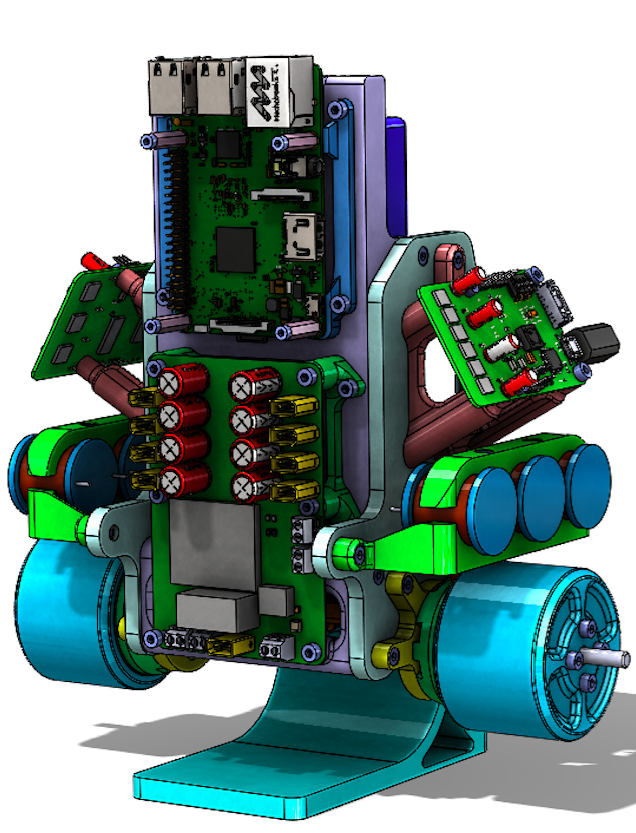
Bobble-Bot is a two-wheel balancing robot whose released controller repository includes ROS 1 balance logic, Gazebo simulation and analysis tools. The maintainer recommends starting with simulation. The physical BB2 design adds a Raspberry Pi 3B, custom CAN shield, power distribution board and two Chupacabra servo drives; those are additional reproduction requirements, not components supplied by the simulator. [1] [5] [6]
Is this for you?
3D preview
Bobble-Bot simulation assembly. The Gazebo source configuration at zero joint positions, including its supplied battery, electronics and camera representations. It is visualization geometry, not a complete manufacturing package.
The 3D preview loads after the page.
Drag to orbit · Scroll or pinch to zoom · Right-drag to pan. Use the view buttons for front, side and top views. The tree shows names supplied by the source; unnamed bodies remain labeled as such.
Download original URDF source bundle (ZIP) · File checksums and provenance
Separate bodies can be inspected in the model tree. Explode is a viewing aid, not an assembly sequence.
Model sources
The preview uses the linked original design. Source grouping is retained where present; the caption identifies whether this is an assembly or one component.
Source, license and scale
Source: S.O. Engineering, LLC / Bobble-Bot contributors, revision b7db2607759d256b1bcf729ab943d1794c2774d2. Original and preview: BSD-3-Clause. Preview conversion by Open Source Robotics; source files unchanged inside the downloadable bundle. Preview coordinates are centered and rounded to six decimal places. URDF visual origins, mesh scales and joint transforms applied at zero joint positions, then metres converted to millimetres. No physical part tested.
Viewer: three-cad-viewer 5.0.7 (MIT license). Confirm scale and manufacturing settings before printing.
What you need
Hardware & parts
Upstream bill of materials [6]
- Hardware configuration
Two-wheel inverted-pendulum balancing robot.
- Actuators
- Two Turnigy Multistar 4822-690kV 22-pole BLDC motors in the BB2 BOM
Harness overview separately labels motors TACON; reconcile document revisions before procurement.
- Controller
Raspberry Pi 3B with custom SOE CAN shield, PDU and two Chupacabra servo drives.
Assembly & first use
Cost
No current, complete configuration-specific build cost has been established for this profile.
Project notes
Preserve both simulation repositories
The documented source build uses ROS Melodic, Gazebo, Hector Gazebo plugins and catkin, with both bobble_controllers and bobble_description cloned into one workspace. This review preserved the controller revision recorded in the profile and description commit b7db2607759d256b1bcf729ab943d1794c2774d2. They were not built or tested together. The README's generic clones and unpinned Python packages do not constitute a locked environment. [1] [2] [10]
Keyboard control requires its terminal to have focus and uses the space bar to activate the balance controller. The upstream impulse-response example records a ROS bag, then generates tilt and velocity plots. That gives readers a defined simulation experiment to investigate; this review did not execute it or reproduce the published plots. [1]
Simulation parameters are not hardware limits
config/bobble_sim_balance_control.yaml selects BalanceSimController with InSim: true, a 500 Hz control-loop setting, 0.05 m wheel radius and starting/maximum tilt settings of 10/20 degrees. These are source configuration values. They do not establish a measured loop rate, physical stability envelope or tested stopping behavior. The file's IMU name is bno055, while the physical BOM names a DFRobot SEN0140; preserve the distinction when mapping a real device. [6] [9]
The documented Docker graphics route historically required an NVIDIA GPU; its headless route did not require graphics. The container payload and its current compatibility were not validated here. [1]
The historical BOM is useful but not a complete quote
The preserved BB2 workbook lists printed part numbers, fasteners, a 4S 5000 mAh battery, two Turnigy Multistar 4822-690kV motors, wheel encoders and the custom boards. Several board and encoder prices are blank. Some fastener prices are for packs rather than quantities consumed, and cell I26 sums only H20:H26. That subtotal is not the cost of a complete robot. No current regional availability or delivered total was verified. [6]
The six-page assembly document identifies mirrored actuator parts, the central bulkhead, electronics mounts and IMU placement. Its exploded actuator drawing connects the wheel, motor, AS5047D sensor and Chupacabra drive. These instructions help interpret the parts list, but they do not by themselves supply complete editable designs and firmware for every custom board. [7]
Reconcile the wiring documents before procurement
The cable-harness document identifies power, CAN, encoder, IMU and PDU-enable connections. It also contains discrepancies that should be resolved against the actual hardware revision: its overview labels the motors TACON while the BOM and assembly document specify Turnigy Multistar. On page 5, the IMU harness parts list names connector 5023800900, while the four-pin drawing labels it 5023800400. This review preserves both readings and does not choose a replacement part or validate a wiring procedure. [6] [7] [8]
The controller and description repositories carry BSD 3-Clause notices. The external BOM and assembly files are available to read, but their redistribution terms and a complete matching hardware source set were not established. The profile therefore covers a useful open simulation/control project with documented physical hardware, rather than claiming a fully reproduced or commercially qualified build. No installation, fabrication, wiring or balancing test was performed. [3] [5] [11] [12]
What we checked
Source research only; no installation, physical build or performance test performed. No affiliate links added.
Not yet established
- Requirements: tools
- A step-by-step setup summary
Updates
- Upstream last updated
- Dec 5, 2021 [2]
- Latest release
- Not established
- Profile updated
- Oct 25, 2026
- Sources last checked
- Oct 1, 2026
- Next review
- Oct 31, 2026
- Reviewed revision
- 07ea4f9f1282d4e2cf5cc423aee7b5e0621a10c7 (commit snapshot; no published stable release found) · combined hardware and software repository
Source files and licenses
Available project sources support research coverage; complete build and commercial qualification remain separate.
| Layer | Availability / license |
|---|---|
| mechanical design | available · License not fully assessed Robot description/model repository preserved under BSD-3-Clause software notice; manufacturing completeness and hardware-specific rights unresolved. [10] [11] |
| electronics | not found · License not fully assessed Custom Chupacabra, CAN shield and PDU are documented, but complete matching editable board source and device firmware were not established by this review. [5] [6] [8] [12] |
| firmware | not found · License not fully assessed Custom Chupacabra, CAN shield and PDU are documented, but complete matching editable board source and device firmware were not established by this review. [5] [6] [8] [12] |
| software | available · BSD-3-Clause Balance controller and simulation software; external ROS, Gazebo and dependencies retain separate terms. [1] [3] |
| documentation | available · BSD-3-Clause Repository documentation only; separate Hackaday PDF/BOM rights were not established. [1] [3] |
Selected feedback-control and simulation workflow needs no pretrained policy or dataset.
References
Each source links to the exact revision we read. “Used for” shows where this page relies on it.
Project sources
- S001 super-owesome/bobble_controllers: README.md
Revision, date & where cited
github.com · revision
07ea4f9· Accessed Oct 1, 2026
Used for: Overview, Is this for you?, What you need, Hardware & parts and 4 more - S002 super-owesome/bobble_controllers: commit 07ea4f9
Revision, date & where cited
github.com · Accessed Oct 1, 2026
Used for: Preserve both simulation repositories, What we checked - S003 super-owesome/bobble_controllers: LICENSE
Revision, date & where cited
github.com · revision
07ea4f9· Accessed Oct 1, 2026
Used for: Reconcile the wiring documents before procurement, Source files and licenses - S004 super-owesome/bobble_controllers: files
Revision, date & where cited
github.com · revision
07ea4f9· archive file inventory · Accessed Oct 1, 2026 - S005 Maintainer hardware project and build log
Revision, date & where cited
super-owesome / project contributors · hackaday.io · Components and Build a Bobble-Bot log, September 2019 · Accessed Oct 1, 2026
Used for: Overview, Is this for you?, Hardware & parts, Assembly & first use and 2 more - S006 BB2 bill of materials
Revision, date & where cited
super-owesome / project contributors · cdn.hackaday.io · bb2a.csv!A1:I36; extracted cells and formulas · Accessed Oct 1, 2026
Used for: Overview, Is this for you?, What you need, Hardware & parts and 5 more - S007 Bobble-Bot assembly instructions
Revision, date & where cited
super-owesome / project contributors · cdn.hackaday.io · Six pages; actuator diagram page 4 visually inspected · Accessed Oct 1, 2026
Used for: Hardware & parts, Assembly & first use, The historical BOM is useful but not a complete quote, Reconcile the wiring documents before procurement - S008 Bobble-Bot cable harnesses
Revision, date & where cited
super-owesome / project contributors · cdn.hackaday.io · Revision 2.1, September 29 2019; six pages; connector discrepancy on page 5 visually inspected · Accessed Oct 1, 2026
Used for: Is this for you?, Assembly & first use, Reconcile the wiring documents before procurement, Source files and licenses - S009 Simulation controller configuration
Revision, date & where cited
github.com · revision
07ea4f9· Accessed Oct 1, 2026
Used for: Is this for you?, Assembly & first use, Simulation parameters are not hardware limits - S010 Robot description README.md
Revision, date & where cited
github.com · revision
b7db260· Accessed Oct 1, 2026
Used for: What you need, Preserve both simulation repositories, Source files and licenses - S011 Robot description LICENSE
Revision, date & where cited
github.com · revision
b7db260· Accessed Oct 1, 2026
Used for: Reconcile the wiring documents before procurement, Source files and licenses - S012 Maintainer downloadable file index
Revision, date & where cited
super-owesome / project contributors · hackaday.io · Preserved file listing · Accessed Oct 1, 2026
Used for: Reconcile the wiring documents before procurement, Source files and licenses - S016 Upstream image and reuse attribution
Media-only review: Upstream CAD illustration of Bobble-Bot, not a photograph. Reuse basis: BSD-3-Clause; inspected LICENSE and the pinned file inventory for nearer notices. Original image unchanged; displayed responsively. This does not refresh technical or cost evidence.Revision, date & where cited
S.O. Engineering, LLC and Bobble-Bot contributors · github.com · revision
07ea4f9· Image SHA-256 c90ad945d1ee278f9d0908401c7becf40e5ca7e51ba4250e0a9bfe3626f35245; repository · Accessed Oct 25, 2026
Videos
- S013 Bobble On, Bobble-Bot - Hackaday Prize 2019 (YouTube video)
Video from the project’s own channel (Super Owesome), linked from the project’s own documentation. Not reviewed by us for accuracy.Revision, date & where cited
YouTube video Super Owesome · youtube.com · Accessed Oct 4, 2026
- S014 Bobble Bot Assembly (YouTube video)
Video from the project’s own channel (Super Owesome), linked from the project’s own documentation. Not reviewed by us for accuracy.Revision, date & where cited
YouTube video Super Owesome · youtube.com · Accessed Oct 4, 2026
- S015 Bobblebot Drive without Inductors (YouTube video)
Video from the project’s own channel (Super Owesome), linked from the project’s own documentation. Not reviewed by us for accuracy.Revision, date & where cited
YouTube video Super Owesome · youtube.com · Accessed Oct 4, 2026
Correction guidance · Discussion is not enabled · Profile format 0.6.0-draft.1
Change history
2026-10-04 — Added 3 YouTube reference(s) (S013, S014, S015): official channel or videos linked from the pinned upstream sources. Existing claims, source-check dates and evidence are unchanged.
2026-10-25 — Added an attributed upstream image with linked reuse terms; technical evidence dates unchanged.