JPL Open Source Rover
Robot / hardware buildSix-wheel rocker-bogie rover with off-the-shelf mechanical parts and separate ROS control software; reviewed hardware and software snapshots need version and calibration reconciliation. [1]
Build & first use →Official websiteBill of materials
- For
- Clubs and labs able to assemble mechanics, solder boards and configure ROS control [1]
- Cost
- No current cost yet. Upstream bill of materials [5]
- Source rights
- Named licenses are documented by part. Review licenses
- Unknowns
- host computer, tools, operating system not fully established. Review gaps
Source researched · Not tested by us
Sources checked · Research details

Licenses & related hardware
- License
- Apache-2.0 · Details by part
Overview
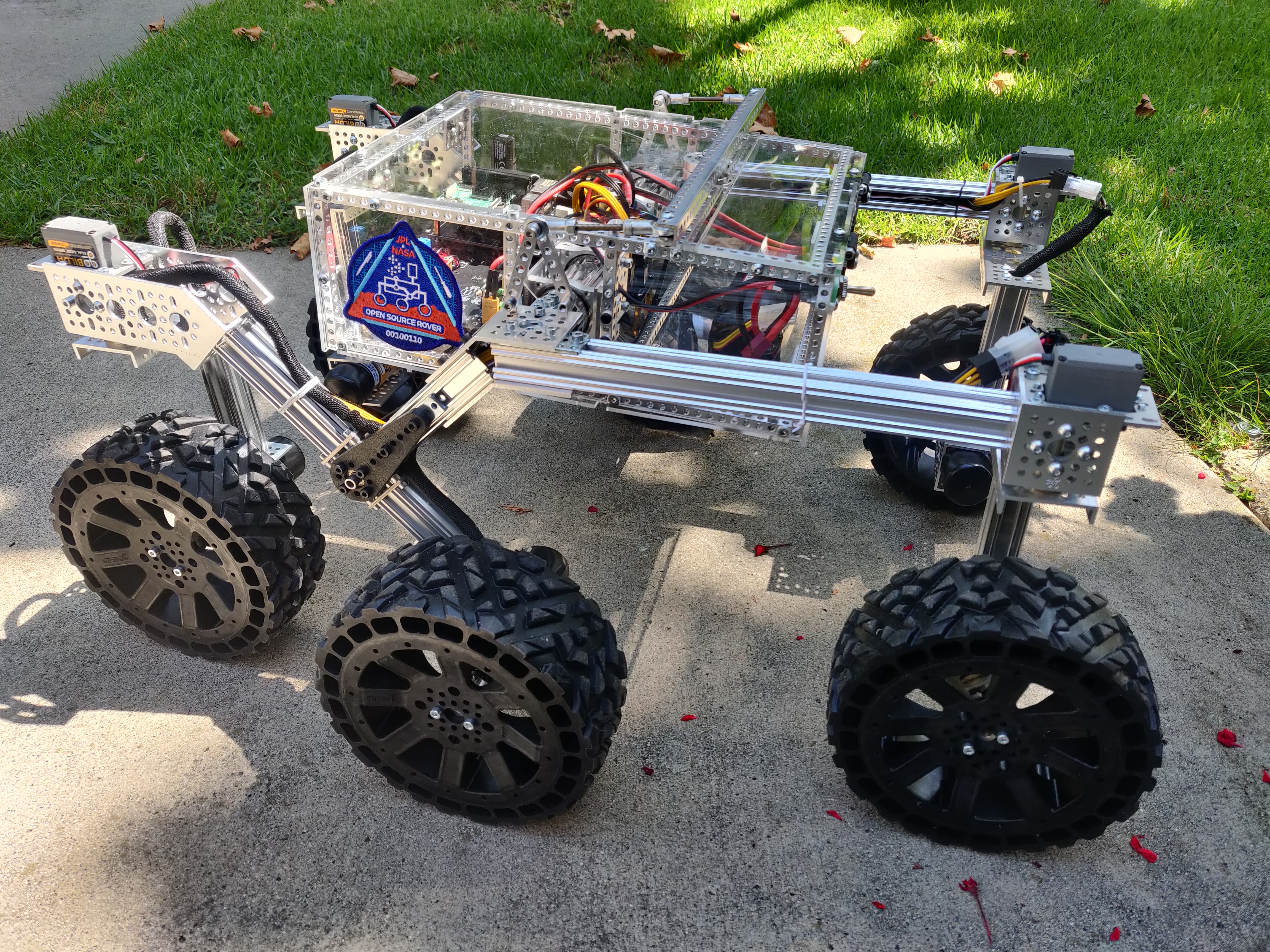
The JPL Open Source Rover is a six-wheel rocker-bogie platform with six drive motors and four steering servos. The reviewed hardware release is v4.0.0, with off-the-shelf aluminum parts, electronics assembly and wiring documentation. It offers a substantial build project for learning rover mechanics and control; it is not a small version of flight-qualified Mars hardware. [1] [2] [5]
Is this for you?
- Known limitations
- PCB guide names v2.0.3 but contains unfinished update notes and older assembly images
- Software overview and detailed setup name different ROS distributions
- Guide refers to a custom launch file absent from the saved archive
- Published parts subtotal excludes essential extra components
Documentation and inventory comparison, not runtime testing.
3D preview
JPL Open Source Rover simulation assembly. The Gazebo robot-description configuration, shown at zero joint positions. Source meshes and rocker-bogie link hierarchy are retained; this does not establish an exact current hardware revision or working rover.
The 3D preview loads after the page.
Drag to orbit · Scroll or pinch to zoom · Right-drag to pan. Use the view buttons for front, side and top views. The tree shows names supplied by the source; unnamed bodies remain labeled as such.
Download original URDF source bundle (ZIP) · File checksums and provenance
Separate bodies can be inspected in the model tree. Explode is a viewing aid, not an assembly sequence.
Model sources
The preview uses the linked original design. Source grouping is retained where present; the caption identifies whether this is an assembly or one component.
Source, license and scale
Source: California Institute of Technology / JPL Open Source Rover contributors, revision 6b17c22a900182f5339c23ba1f86739b5c9e8c1c. Original and preview: Apache-2.0. Preview conversion by Open Source Robotics; source files unchanged inside the downloadable bundle. Preview coordinates are centered and rounded to six decimal places. URDF visual origins, mesh scales and joint transforms applied at zero joint positions, then metres converted to millimetres. No physical part tested.
Viewer: three-cad-viewer 5.0.7 (MIT license). Confirm scale and manufacturing settings before printing.
What you need
Hardware & parts
Assembly & first use
- Choose the hardware and PCB revision and reconcile the board instructions
- Complete the parts list with excluded power, host, wiring and tools
- Select and preserve a compatible software/OS/ROS configuration
- Establish the custom launch/configuration files and calibrate corners with wheels supported
- Verify manual operation before enabling startup services
Editorial sequence; not a tested build or commissioning procedure.
Cost
No current, complete configuration-specific build cost has been established for this profile.
The parts subtotal is not the complete setup cost
The README gives a rough $1,600 figure, while the detailed parts document reports $1,360.74. The latter explicitly leaves additional items outside its total. These include three RoboClaw 2x7A motor controllers, voltage regulators, a PCA9685 servo-control board, a Raspberry Pi, battery and charger, wiring supplies, mounting accessories and tools. A gamepad is also recommended. Do not interpret either historical number as a current delivered, ready-to-drive budget. This review did not obtain a complete regional supplier quote. [1] [5] [6]
The base mechanical design is described as requiring no metal machining, but assembly still includes board work and custom wiring. The PCB guide is headed v2.0.3 yet retains notes about unfinished instruction updates and notes that some pictures come from v2.0.1. Match the actual board revision, manufacturing files and instructions before ordering or soldering. [1] [7] [8]
Project notes
Preserve the software separately
The robot-control code lives in osr-rover-code, which has been preserved at a separate commit for this review. Its overview says ROS 2 was tested on Foxy, while the detailed Raspberry Pi setup now assumes Jazzy and asks readers to match the operating system and ROS release. That discrepancy is a reason to record and validate one selected environment, not a claim that every distribution works. No software installation was performed here. [9] [10] [15]
The setup guide uses a ROS workspace, Python dependencies, serial communication and I2C. The bringup guide then covers wheel geometry, steering-center calibration and gamepad mappings. It recommends supporting the rover so the wheels can turn without driving the chassis during initial checks. These configuration steps remain necessary even when the mechanics follow the default build. [10] [11]
The PCB instructions also require configuring each RoboClaw: distinct addresses 128–130, Packet Serial at 115200 baud and Multi-Unit mode. They call for checking motor and encoder directions and saving settings to each controller’s non-volatile memory. The software setup then checks communication with all three controllers. These are upstream commissioning requirements, not checks performed by this review. [7] [10]
Resolve the custom launch file before calibration
The calibration instructions tell the builder to edit osr_mod_launch.py, but that file is not present in the saved software archive. The default osr_launch.py does contain steering-center parameters, and the startup script selects the custom file only if it exists, otherwise falling back to the default. A builder must establish and verify the intended custom launch configuration before relying on those instructions; this review has not created or tested that configuration on a rover. [11] [12] [13] [15]
Upstream also says to validate manual operation before enabling automatic startup, and to stop the background service while recalibrating or launching code manually. Keep that distinction in the commissioning plan so configuration work does not compete with an already running controller. [11]
Both the hardware-plan repository and the separately inspected control repository carry Apache-2.0 licenses. Purchased motors, controller firmware and other components retain their own terms. The catalog records available build plans and software, along with revision and setup gaps; it does not claim a completed build, tested drive performance or a complete source archive for every component. [3] [14]
What we checked
Source research only; no installation, physical build or performance test performed. No affiliate links added.
Not yet established
- Requirements: operating system, host computer, tools
Updates
Source files and licenses
Available project sources support research coverage; complete build and commercial qualification remain separate.
| Layer | Availability / license |
|---|---|
| mechanical design | available · Apache-2.0 Repository build plans and documentation; purchased components retain separate rights. No complete manufacturer source for every COTS part implied. [1] [3] [4] |
| electronics | available · Apache-2.0 Repository build plans and documentation; purchased components retain separate rights. No complete manufacturer source for every COTS part implied. [1] [3] [4] |
| firmware | not found · License not fully assessed Complete matching RoboClaw/controller firmware source not established in the inspected archives. [8] [15] |
| software | available · Apache-2.0 Separately preserved control repository; not a verified matched release for the hardware snapshot. [9] [14] [15] |
| documentation | available · Apache-2.0 Repository build plans and documentation; purchased components retain separate rights. No complete manufacturer source for every COTS part implied. [1] [3] [4] |
Rover platform profile selects no learned policy or dataset.
References
Each source links to the exact revision we read. “Used for” shows where this page relies on it.
Project sources
- S001 nasa-jpl/open-source-rover: README.md
Revision, date & where cited
github.com · revision
85078c2· Accessed Oct 1, 2026
Used for: Overview, Hardware & parts, Assembly & first use, Cost and 1 more - S002 nasa-jpl/open-source-rover: commit 85078c2
- S003 nasa-jpl/open-source-rover: LICENSE.txt
Revision, date & where cited
github.com · revision
85078c2· Accessed Oct 1, 2026
Used for: Resolve the custom launch file before calibration, Source files and licenses - S004 nasa-jpl/open-source-rover: files
Revision, date & where cited
github.com · revision
85078c2· archive file inventory · Accessed Oct 1, 2026
Used for: Source files and licenses - S005 Rover v4.0.0: parts_list/README.md
Revision, date & where cited
github.com · revision
85078c2· Accessed Oct 1, 2026
Used for: Overview, Is this for you?, Hardware & parts, Assembly & first use and 1 more - S006 Rover v4.0.0: parts_list/extra_parts.md
Revision, date & where cited
github.com · revision
85078c2· Accessed Oct 1, 2026
Used for: Is this for you?, Assembly & first use, Cost - S007 Rover v4.0.0: electrical/pcb/README.md
Revision, date & where cited
github.com · revision
85078c2· Accessed Oct 1, 2026
Used for: Is this for you?, Assembly & first use, Cost, Preserve the software separately - S008 Rover v4.0.0: electrical/wiring/README.md
Revision, date & where cited
github.com · revision
85078c2· Accessed Oct 1, 2026
Used for: Hardware & parts, Assembly & first use, Cost, Source files and licenses - S009 Separate rover software: README.md
Revision, date & where cited
github.com · revision
6b17c22· Accessed Oct 1, 2026
Used for: Is this for you?, What you need, Preserve the software separately, Source files and licenses - S010 Separate rover software: setup/rpi.md
Revision, date & where cited
github.com · revision
6b17c22· Accessed Oct 1, 2026
Used for: Is this for you?, What you need, Hardware & parts, Assembly & first use and 1 more - S011 Separate rover software: setup/rover_bringup.md
Revision, date & where cited
github.com · revision
6b17c22· Accessed Oct 1, 2026
Used for: Is this for you?, Hardware & parts, Assembly & first use, Preserve the software separately and 1 more - S012 Separate rover software: ROS/osr_bringup/launch/osr_launch.py
Revision, date & where cited
github.com · revision
6b17c22· Accessed Oct 1, 2026
Used for: Assembly & first use, Resolve the custom launch file before calibration - S013 Separate rover software: init_scripts/launch_osr.sh
Revision, date & where cited
github.com · revision
6b17c22· Accessed Oct 1, 2026
Used for: Assembly & first use, Resolve the custom launch file before calibration - S014 Separate rover software: LICENSE.txt
Revision, date & where cited
github.com · revision
6b17c22· Accessed Oct 1, 2026
Used for: Resolve the custom launch file before calibration, Source files and licenses - S015 Preserved software revision and inventory
Revision, date & where cited
github.com · revision
6b17c22· Separate snapshot; no release compatibility claim · Accessed Oct 1, 2026
Used for: Is this for you?, Preserve the software separately, Resolve the custom launch file before calibration, Source files and licenses - S019 Upstream image and reuse attribution
Media-only review: Upstream photograph of a JPL Open Source Rover build outdoors. Reuse basis: Apache-2.0; inspected LICENSE.txt and the pinned file inventory for nearer notices. Original image unchanged; displayed responsively. This does not refresh technical or cost evidence.Revision, date & where cited
California Institute of Technology and NASA JPL Open Source Rover contributors · github.com · revision
85078c2· Image SHA-256 4736c79aa9c356a0bd176b7c468c64110370c0b885861890d5d13da1ccb3faca; repository · Accessed Oct 25, 2026
Videos
- S016 NASA-JPL Open-Source Rover (OSR) v2 going for a ride (YouTube video)
Video uploaded by Achille Verheye, linked from the project’s own documentation. Not reviewed by us for accuracy.Revision, date & where cited
YouTube video Achille Verheye · youtube.com · Accessed Oct 4, 2026
- S017 OSR with upgraded drive motors (YouTube video)
Video uploaded by Achille Verheye, linked from the project’s own documentation. Not reviewed by us for accuracy.Revision, date & where cited
YouTube video Achille Verheye · youtube.com · Accessed Oct 4, 2026
- S018 Building JPL Open Source Rover V2.0 (YouTube video)
Video uploaded by Sinuhe Huidobro, linked from the project’s own documentation. Not reviewed by us for accuracy.Revision, date & where cited
YouTube video Sinuhe Huidobro · youtube.com · Accessed Oct 4, 2026
Correction guidance · Discussion is not enabled · Profile format 0.6.0-draft.1
Change history
2026-10-04 — Added 3 YouTube reference(s) (S016, S017, S018): official channel or videos linked from the pinned upstream sources. Existing claims, source-check dates and evidence are unchanged.
2026-10-25 — Added an attributed upstream image with linked reuse terms; technical evidence dates unchanged.