OpenWeedLocator
Robot / hardware buildRaspberry Pi camera and relay subsystem for targeted weed treatment, with printable enclosures and configuration-specific wiring requirements. [1]
Build & first use →Official website
- For
- Agricultural robotics developers and builders evaluating camera-triggered tools [1]
- Cost
- No current cost or bill of materials established yet.
- Source rights
- Named licenses are documented by part. Review licenses
- Unknowns
- tools not fully established. Review gaps
Source researched · Not tested by us
Sources checked · Research details
Overview
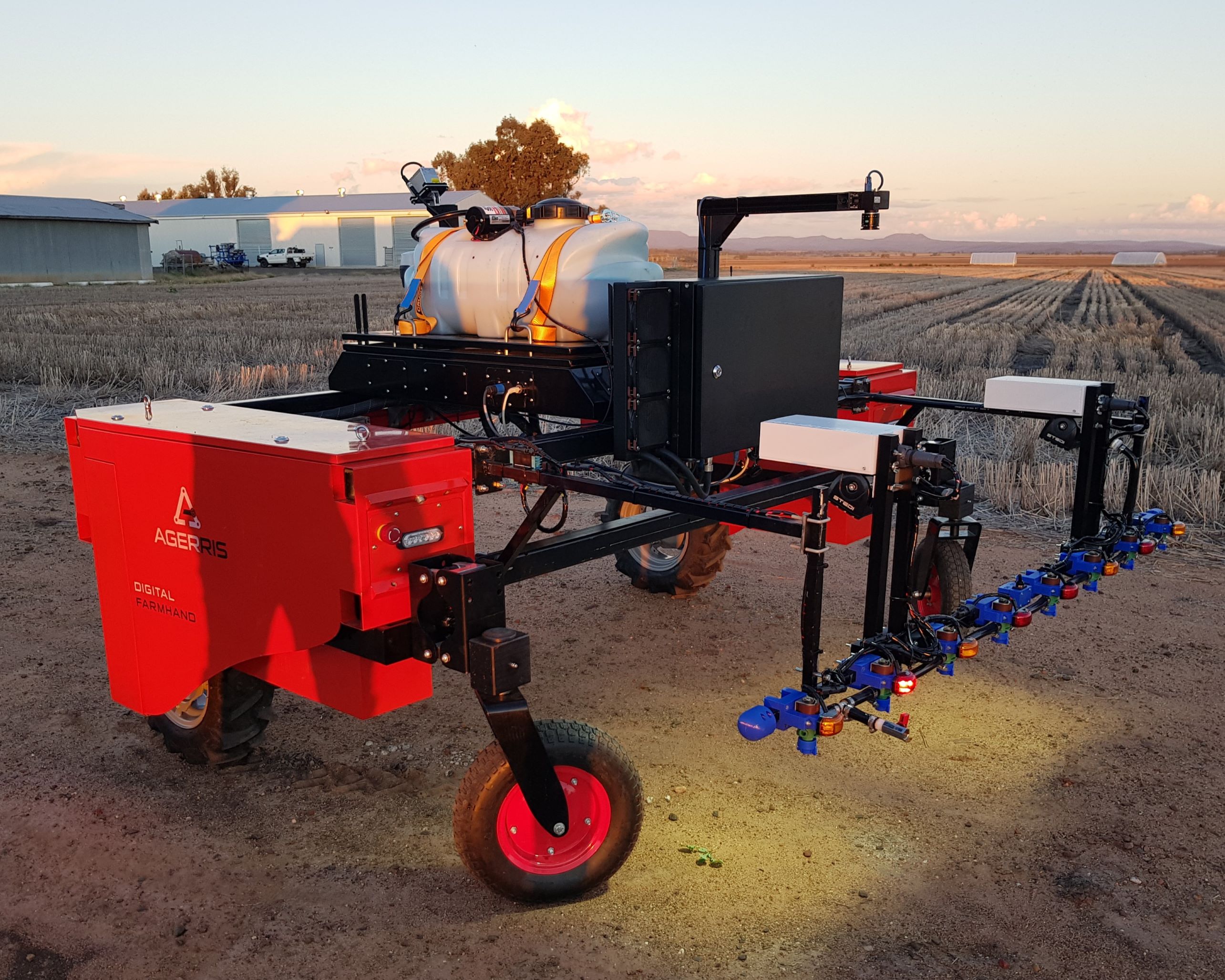
OpenWeedLocator, or OWL, uses a Raspberry Pi camera to detect vegetation and drive relay-controlled outputs. This profile concentrates on the Compact OWL enclosure and the color-based detection route. The vehicle, spray plumbing or other treatment mechanism is a separate integration; OWL source availability does not make a complete agricultural robot. The current source and documentation were preserved as separate revisions. [5] [7]
Is this for you?
- Known limitations
- Color-based detection does not distinguish green crop from green weeds
- Connector naming differs between Compact BOM and wiring instructions
- No complete vehicle, treatment system or delivered budget established
Scope and source-reconciliation findings.
What you need
- Host computer
Selected Compact OWL: Raspberry Pi 5 4 GB; docs also list Pi 4 and 3B+
Hardware & parts
Assembly & first use
Cost
No current, complete configuration-specific build cost has been established for this profile.
3D preview
Preview not available yet. Mesh files were identified. Their source inventory does not by itself establish assembly hierarchy or component placement.
Model sources
Mesh files were identified. Their source inventory does not by itself establish assembly hierarchy or component placement.
Project notes
Select one complete hardware arrangement
The Compact guide lists a Raspberry Pi 5 with 4 GB RAM, with Pi 4 and 3B+ alternatives, and several camera choices. Its recommended Global Shutter Camera needs a suitable lens, camera cable and mount. A printed enclosure also needs inserts, screws, sealing cord and a 37 mm lens filter. Printed plastic alone does not complete the enclosure, and no environmental rating was verified here. [7]
Power and outputs have two routes: the official OWL driver board combines functions, while a generic relay HAT needs a separate regulator. The guide distinguishes the Pi 5 power arrangement from earlier boards. Budget for those components, storage, connectors, tools and the external treatment system; no current complete delivered cost was established. [7] [8]
Wiring instructions contain revision differences
Relay channel numbers must map to the actual board's physical pins. The guide's OWL driver-board example maps channels 0–3 to board pins 13, 15, 16, 18; its particular generic-HAT example instead uses 35, 33, 31, 29. Those examples are not universal Raspberry Pi GPIO mappings. Select the actual HAT and numbering convention before applying a configuration. [7]
The same guide names Fathomlock connectors in the parts table, EcoMate Aquarius in assembly, and a Bulgin connector in the later solenoid section. These references do not establish one interchangeable harness. Exact connector selection and pin correspondence remain unresolved in this review; the article is not a validated wiring recipe. [7]
Commission the camera and storage before closing the enclosure
The guide recommends software setup before inserting the tray because display and USB access become harder afterward. The installer route uses 64-bit Raspberry Pi OS and offers basic, standalone-dashboard and networked configurations. It changes system packages and startup services; none of those operations was executed here. Focus the camera at the intended working distance and inspect detection output before relying on actuation. [7] [9]
The getting-started page requires a USB drive. The inspected source adds useful detail: controller or dashboard configurations force recording infrastructure setup, and storage failures can leave the process alive while it signals an error. Consequently, an apparently running service alone does not prove that detection is ready. Check storage and application logs as well as service status. This source excerpt does not establish a universal USB requirement for every possible headless configuration. [8] [9] [12]
Detection performance depends on the task
The color route uses vegetation-color thresholds and contours to assign detections to output zones. It is useful for separating green vegetation from a contrasting background, but cannot by itself distinguish a green crop from a green weed. Camera focus, lighting, motion blur, target size and detection-to-actuation timing remain application-specific. No field accuracy, treatment efficacy or operating-speed claim was independently tested for this entry. [5] [10]
A separate green-on-green option exists in the current project, but it adds model and dependency requirements. Its weights, datasets, accelerator compatibility and licensing were not qualified here. They are not included in a claim that the base color detector is reproducible. [5] [13]
The main repository is MIT licensed, and the separate documentation repository explicitly adopts that license. Printable models are present in the archive; external boards, purchased components and optional learned-model dependencies need their own assessment. No enclosure was printed, wiring energized, software installed or treatment equipment operated during this review. [5] [6] [11] [13]
What we checked
Source research only; no installation, physical build or performance test performed. No affiliate links added.
Not yet established
- Requirements: tools
- A step-by-step setup summary
Updates
- Upstream last updated
- Apr 4, 2026 [2]
- Latest release
- Apr 4, 2026 [2]
- Profile updated
- Oct 25, 2026
- Sources last checked
- Oct 1, 2026
- Next review
- Oct 31, 2026
- Reviewed revision
- 46296531dba1474887b1238c73f9cf83ac41c47e source branch; documentation 939f9bfabb62633a3d894219495b86793b8e9180 · combined hardware and software repository
Source files and licenses
Available project sources support research coverage; complete build and commercial qualification remain separate.
| Layer | Availability / license |
|---|---|
| mechanical design | available · MIT Repository project license; external components and dependencies require their own terms. Models inventoried, not geometrically validated. [5] [6] [13] |
| electronics | not found · License not fully assessed Purchased Pi/camera/relay components and separate official driver-board sources are outside the matched artifact review. Not a closed-source finding. [7] [13] |
| firmware | not found · License not fully assessed Purchased Pi/camera/relay components and separate official driver-board sources are outside the matched artifact review. Not a closed-source finding. [7] [13] |
| software | available · MIT Repository project license; external components and dependencies require their own terms. Models inventoried, not geometrically validated. [5] [6] [13] |
| model weights | not found · License not fully assessed Optional learned-model route is not qualified here; matched model/data provenance and licenses remain unreviewed. Selected color-detection route does not require learned weights. [5] [13] |
| datasets | not found · License not fully assessed Optional learned-model route is not qualified here; matched model/data provenance and licenses remain unreviewed. Selected color-detection route does not require learned weights. [5] [13] |
| documentation | available · MIT Documentation README explicitly refers to main project MIT license. [6] [11] |
References
Each source links to the exact revision we read. “Used for” shows where this page relies on it.
- S001 geezacoleman/OpenWeedLocator: README.md
Revision, date & where cited
github.com · revision
096eba5· Accessed Oct 1, 2026
Used for: Assembly & first use - S002 geezacoleman/OpenWeedLocator: commit 096eba5
- S003 geezacoleman/OpenWeedLocator: LICENSE
Revision, date & where cited
github.com · revision
096eba5· Accessed Oct 1, 2026 - S004 geezacoleman/OpenWeedLocator: files
Revision, date & where cited
github.com · revision
096eba5· archive file inventory · Accessed Oct 1, 2026 - S005 Current branch README.md
Revision, date & where cited
github.com · revision
4629653· Accessed Oct 1, 2026
Used for: Overview, Is this for you?, Hardware & parts, Detection performance depends on the task and 1 more - S006 Current branch LICENSE
Revision, date & where cited
github.com · revision
4629653· Accessed Oct 1, 2026
Used for: Detection performance depends on the task, Source files and licenses - S007 docs/hardware/compact-owl/index.md
Revision, date & where cited
github.com · revision
939f9bf· Accessed Oct 1, 2026
Used for: Overview, Is this for you?, What you need, Hardware & parts and 4 more - S008 docs/getting-started/index.md
Revision, date & where cited
github.com · revision
939f9bf· Accessed Oct 1, 2026
Used for: What you need, Select one complete hardware arrangement, Commission the camera and storage before closing the enclosure - S009 docs/software/two-step-install.md
Revision, date & where cited
github.com · revision
939f9bf· Accessed Oct 1, 2026
Used for: What you need, Commission the camera and storage before closing the enclosure - S010 docs/usage/operation/index.md
Revision, date & where cited
github.com · revision
939f9bf· Accessed Oct 1, 2026
Used for: Is this for you?, Detection performance depends on the task - S011 README.md
Revision, date & where cited
github.com · revision
939f9bf· Accessed Oct 1, 2026
Used for: Detection performance depends on the task, Source files and licenses - S012 Storage startup implementation
Revision, date & where cited
github.com · revision
4629653· owl.py lines315-372 · Accessed Oct 1, 2026
Used for: What you need, Commission the camera and storage before closing the enclosure - S013 Current archive inventory
Revision, date & where cited
github.com · revision
4629653· Complete archive filenames · Accessed Oct 1, 2026
Used for: Detection performance depends on the task, Source files and licenses - S014 Upstream image and reuse attribution
Media-only review: Upstream photograph of an OpenWeedLocator installation on a larger agricultural vehicle; the vehicle is separate equipment. Reuse basis: MIT; inspected LICENSE and the pinned file inventory for nearer notices. Original image unchanged; displayed responsively. This does not refresh technical or cost evidence.Revision, date & where cited
Guy Coleman and OpenWeedLocator contributors · github.com · Image SHA-256 469e705feaa8bd8eec720976c64d1aaef3f093713752e95918dbb02088a7f114; repository · Accessed Oct 25, 2026
Correction guidance · Discussion is not enabled · Profile format 0.6.0-draft.1
Change history
2026-10-25 — Added an attributed upstream image with linked reuse terms; technical evidence dates unchanged.