TurtleBot4
Robot / hardware buildROS 2 mobile research platform on an iRobot Create 3 base, with distinct Standard/Lite sensor packages and distribution-specific base-firmware requirements. [5] [6]
Build & first use →Official websiteUpstream build guide
- For
- ROS developers and teaching labs using an assembled mobile platform [1]
- Cost
- No current cost or bill of materials established yet.
- Source rights
- Some licenses are unresolved. Review licenses
- Unknowns
- host computer, tools not fully established. Review gaps
Source researched · Not tested by us
Sources checked · Research details
Licenses & related hardware
- License
- Apache-2.0 · license not fully assessed for mechanical design, electronics, documentation · Details by part
Overview
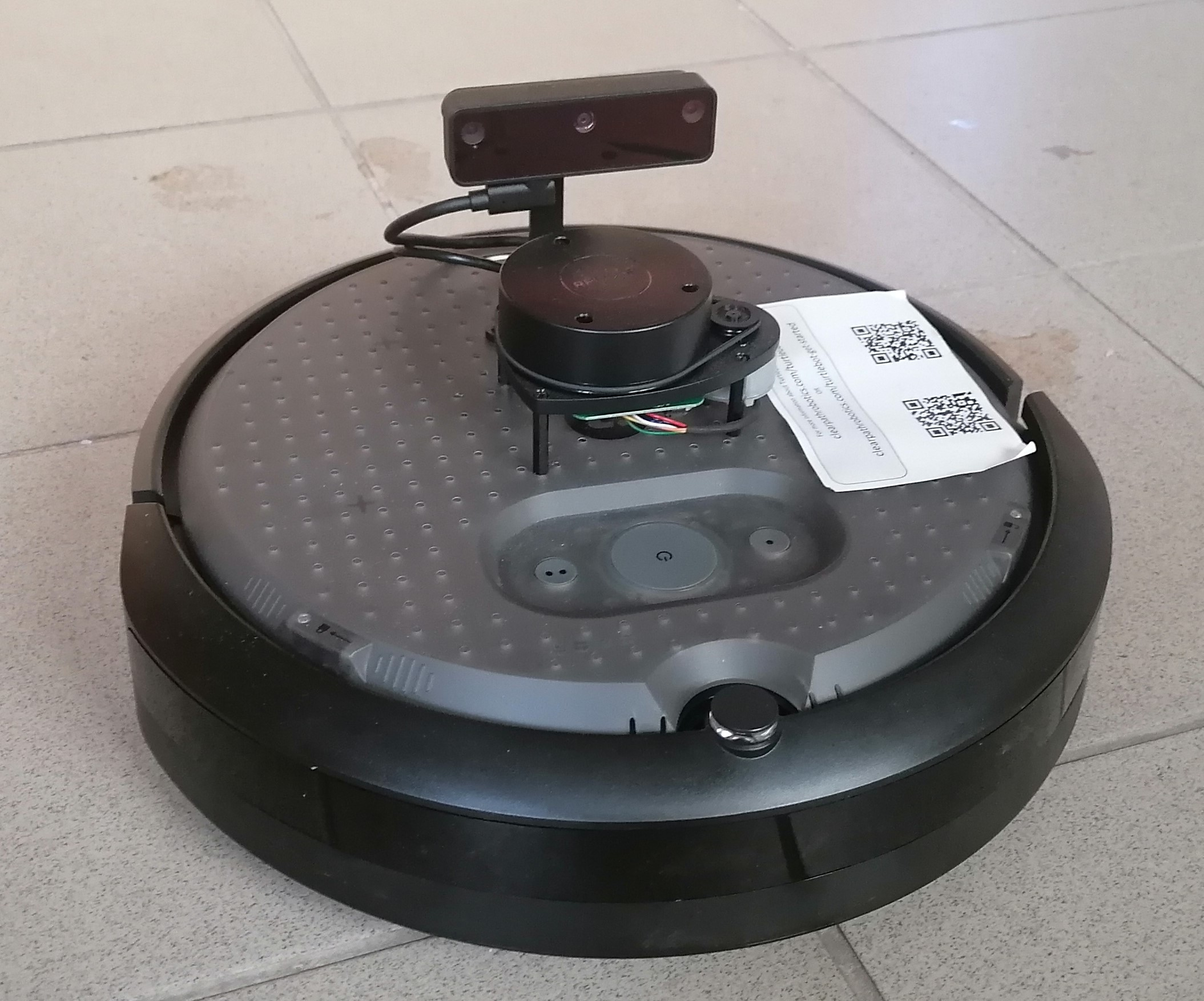
TurtleBot 4 combines an iRobot Create 3 mobile base, a Raspberry Pi 4B and ROS 2 software for education and research. Both Standard and Lite use the RPLIDAR A1M8; Standard adds an OAK-D-Pro camera, a user-interface board and a sensor tower, while Lite uses OAK-D-Lite and a simpler arrangement. Those differences matter when choosing a sensor workload or planning an accessory. [5]
Is this for you?
- Known limitations
- Common software repository is only part of the complete robot stack
- Standard and Lite differ in camera, interface board and expansion hardware
- Create 3 firmware families are not interchangeable between ROS distributions
- Full hardware reuse terms and current complete acquisition price remain unverified
Rights and price are gaps in this review, not a claim that files are closed or unavailable.
3D preview
TurtleBot 4 Standard simulation assembly. The Standard source description with its Create 3 base and configured sensors, at zero joint positions. Separate pinned source repositories and notices are included; this does not represent Lite or verify hardware fit.
The 3D preview loads after the page.
Drag to orbit · Scroll or pinch to zoom · Right-drag to pan. Use the view buttons for front, side and top views. The tree shows names supplied by the source; unnamed bodies remain labeled as such.
Download original URDF source bundle (ZIP) · File checksums and provenance
Separate bodies can be inspected in the model tree. Explode is a viewing aid, not an assembly sequence.
Model sources
The preview uses the linked original design. Source grouping is retained where present; the caption identifies whether this is an assembly or one component.
Source, license and scale
Source: Clearpath Robotics / TurtleBot contributors; iRobot Corporation, revision 7fd29fb420e906f3aca4a904adb54b69b11c7c00. Original and preview: Apache-2.0 / BSD-3-Clause. Preview conversion by Open Source Robotics; source files unchanged inside the downloadable bundle. Preview coordinates are centered and rounded to six decimal places. URDF visual origins, mesh scales and joint transforms applied at zero joint positions, then metres converted to millimetres. No physical part tested.
Viewer: three-cad-viewer 5.0.7 (MIT license). Confirm scale and manufacturing settings before printing.
What you need
- Operating system
- Ubuntu 22.04 with ROS 2 Humble
- Ubuntu 24.04 with ROS 2 Jazzy
Manual host-platform pairings; selected common-code snapshot and other repositories must be matched to the chosen distribution.
Hardware & parts
Assembly & first use
Open the upstream getting-started guide [6] · Project documentation [1]
- Select Standard or Lite and a matching ROS distribution
- Match Create 3 firmware family and middleware to that distribution
- Configure the Pi and remote PC using the version-specific networking instructions
- Use the republished Create 3 interfaces when that network configuration is enabled
- Validate sensing and control before attempting application-level navigation
Editorial sequence; no robot setup or navigation test performed.
Cost
No current, complete configuration-specific build cost has been established for this profile.
Project notes
Pick the software combination before updating
The preserved manual pairs Humble with Ubuntu 22.04 and Jazzy with Ubuntu 24.04. Create 3 firmware must match: H-series firmware is for Humble, and I-series is for Jazzy. The Jazzy instructions additionally distinguish separate Fast DDS and Cyclone DDS firmware images; the base cannot switch between them in the same way as earlier versions. Updating to an arbitrary newer firmware is therefore not a complete setup strategy. [6]
The turtlebot4 repository reviewed here contains common packages used by physical and simulated robots. It is not the whole system: the manual distinguishes robot, desktop and simulator packages. Match those packages and the base firmware to the chosen distribution, rather than assuming the common repository's source snapshot supplies a complete robot image. [1] [2] [8]
Network configuration affects the interfaces you use
The setup guide starts with configuring the Raspberry Pi's network connection and then choosing the appropriate discovery configuration. Where the Create 3 republisher is enabled, the Pi relays selected topics, actions and services so the base is not exposed to all network discovery traffic. The manual says ordinary user nodes should use those republished interfaces, not the hidden _do_not_use namespace. A visible Pi on Wi-Fi is only one part of establishing the intended ROS communication path. [6] [7]
This review did not configure a robot, measure network performance or run navigation. A sensible first validation is to confirm the selected firmware/middleware combination and the required sensor/control interfaces before adding a mapping or navigation workload. [6] [7]
Distinguish modification files from a complete open build
The separately preserved hardware repository includes assembly geometry, component STEP/DXF/PDF files and a PCB manufacturing ZIP. The manual uses these files to support accessory design and modifications to the integration plate. Their presence does not establish a complete reproducible manufacturing package for the purchased Create 3 base. [9] [10]
The common software repository has an Apache-2.0 license. This review has not established the precise reuse terms for the separate hardware archive, manual, base firmware and every sensor dependency; it therefore records partial openness rather than extending the software license across the physical robot. No current complete purchase price or delivered-build budget was verified. [3] [5] [10]
What we checked
Source research only; no installation, physical build or performance test performed. No affiliate links added.
Not yet established
- Requirements: host computer, tools
Updates
- Upstream last updated
- Sep 9, 2025 [2]
- Latest release
- Not established
- Profile updated
- Oct 26, 2026
- Sources last checked
- Oct 1, 2026
- Next review
- Oct 31, 2026
- Reviewed revision
- 7fd29fb420e906f3aca4a904adb54b69b11c7c00 (commit snapshot; no published stable release found) · combined hardware and software repository
Source files and licenses
Available project sources support research coverage; complete build and commercial qualification remain separate.
| Layer | Availability / license |
|---|---|
| mechanical design | available · License not fully assessed Hardware archive preserved; geometry/drawings and PCB manufacturing ZIP found. Complete base manufacturing sources and precise hardware reuse terms not verified. [9] [10] |
| electronics | available · License not fully assessed Hardware archive preserved; geometry/drawings and PCB manufacturing ZIP found. Complete base manufacturing sources and precise hardware reuse terms not verified. [9] [10] |
| firmware | not found · License not fully assessed Base firmware downloads/version requirements documented; matching source code and reuse terms not established here. [6] [7] |
| software | available · Apache-2.0 Common-package repository only; robot, desktop, base and sensor dependencies need separate version/license matching. [3] [8] |
| documentation | available · License not fully assessed Manual source preserved separately; documentation-wide reuse terms not established. [5] [6] |
Mobile platform profile selects no pretrained model or dataset.
References
Each source links to the exact revision we read. “Used for” shows where this page relies on it.
- S001 turtlebot/turtlebot4: README.md
Revision, date & where cited
github.com · revision
7fd29fb· Accessed Oct 1, 2026
Used for: Assembly & first use, Pick the software combination before updating - S002 turtlebot/turtlebot4: commit 7fd29fb
Revision, date & where cited
github.com · Accessed Oct 1, 2026
Used for: Pick the software combination before updating, What we checked - S003 turtlebot/turtlebot4: LICENSE
Revision, date & where cited
github.com · revision
7fd29fb· Accessed Oct 1, 2026
Used for: Distinguish modification files from a complete open build, Source files and licenses - S004 turtlebot/turtlebot4: files
Revision, date & where cited
github.com · revision
7fd29fb· archive file inventory · Accessed Oct 1, 2026 - S005 TurtleBot 4 manual: overview/features.md
Revision, date & where cited
github.com · revision
4455a75· Accessed Oct 1, 2026
Used for: Overview, Is this for you?, Hardware & parts, Assembly & first use and 2 more - S006 TurtleBot 4 manual: setup/basic.md
Revision, date & where cited
github.com · revision
4455a75· Accessed Oct 1, 2026
Used for: Is this for you?, What you need, Assembly & first use, Pick the software combination before updating and 2 more - S007 TurtleBot 4 manual: software/create3.md
Revision, date & where cited
github.com · revision
4455a75· Accessed Oct 1, 2026
Used for: What you need, Hardware & parts, Assembly & first use, Network configuration affects the interfaces you use and 1 more - S008 TurtleBot 4 manual: software/turtlebot4_common.md
Revision, date & where cited
github.com · revision
4455a75· Accessed Oct 1, 2026
Used for: Is this for you?, What you need, Pick the software combination before updating, Source files and licenses - S009 TurtleBot 4 manual: mechanical/turtlebot4.md
Revision, date & where cited
github.com · revision
4455a75· Accessed Oct 1, 2026
Used for: Assembly & first use, Distinguish modification files from a complete open build, Source files and licenses - S010 Preserved hardware archive inventory
Revision, date & where cited
github.com · revision
6256d89· Separate hardware snapshot and complete outer archive file inventory · Accessed Oct 1, 2026
Used for: Is this for you?, Assembly & first use, Distinguish modification files from a complete open build, Source files and licenses - S011 Upstream image and reuse attribution
Media-only review: Paper photograph of a TurtleBot4 Lite on its Create 3 base, with the low sensor deck and OAK-D Lite camera. The Standard model has a different sensor and deck arrangement. Reuse basis: CC-BY-4.0. The chapter’s page 4 labels Figure 4 as its own photograph (Quelle: eigene Aufnahme) of the Turtlebot 4 used in its experiment. Its visible low deck and bar-shaped OAK-D Lite camera identify the Lite configuration among the profile’s Standard/Lite variants. Every chapter page carries the actual author copyright and explicit CC BY 4.0 statement. No manufacturer-photo grant inferred. Embedded image extracted from page 4 of the source PDF and losslessly decoded to PNG; no retouching. Technical/cost evidence dates unchanged.Revision, date & where cited
Nico Beyer and Jens Jäkel · doi.org · Flexible Testplattform für mobile Robotik mit Anwendungsbeispiel des Flottenmanagements in der Intralogistik, page 4 (printed 408), Bild 4, image index 1; image SHA-256 3cb4756b239ab76c8897bb4a887f382575c345296a2e10bf39a3210d6fda1dd3 · Accessed Oct 26, 2026
Correction guidance · Discussion is not enabled · Profile format 0.6.0-draft.1
Change history
2026-10-26 — Added attributed upstream media with linked reuse terms; technical evidence dates unchanged.